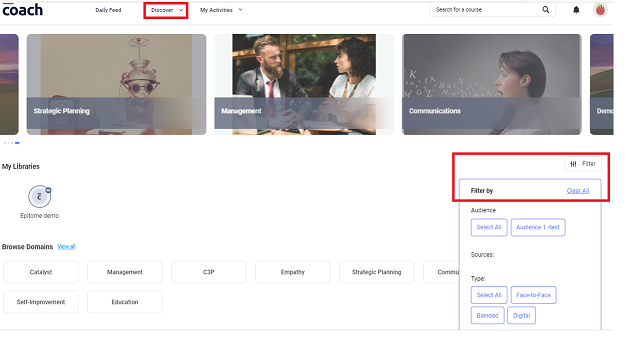
On the Discover page, the search can be narrow down using the filters on the right side of the screen. You may filter by Audience, Sources and Type.
The Discover page consists of:
- My Libraries
- Browse Domains (the user may browse according to the Domain or by View All)
- Learning Pathways (the user may browse according to the Learning Pathway or by View All)
- Catalyst
- Management
- Strategic Planning
- Communications
- Self Improvement
- Education
Was this article helpful?
That’s Great!
Thank you for your feedback
Sorry! We couldn't be helpful
Thank you for your feedback
Feedback sent
We appreciate your effort and will try to fix the article